

Crosstie Join early access →Early access

One system, from engagement to filed return

Tax software that checks its own work.

When it's you, or you and a few people, there's no second reviewer waiting behind you. Crosstie ties every figure back to where it came from and tells you exactly what doesn't tie. When it can't stand behind a number, it stops and says why instead of guessing.

Two products: Crosstie Practice runs the firm, and Crosstie Tax files the return. Both include the workpaper that checks every figure. Use either one alongside what you already have, or both as one system.

Join the early-access list

We'll only use this to contact you about Crosstie.

Working today · what other practice software doesn't do

Built for the way a small firm actually runs

Two products, one system

Crosstie Practice and Crosstie Tax

Crosstie runs a tax practice end to end. Clients sign, pay and upload documents in one portal. Those documents build a workpaper that ties every figure to its source and stops rather than guessing. The workpaper then feeds the return — no re-keying, no second system, nothing lost in between.

Crosstie Practice runs the firm. Crosstie Tax prepares and files the return. Workpapers are included in both: client documents are read into a checked workpaper, at no extra charge. Each product stands alone, and they're better together. Crosstie Tax coming soon

Working today

Crosstie Practice

Run the firm from one place: clients, engagements, documents, deadlines and billing. Keep the tax software you use today. Crosstie Practice works alongside it.

Organizers that feed the return

In most products the organizer is a form the client fills in and someone retypes. Here the answers go straight into the workpaper.

Client portal

Engagement letters, e-signatures and payments

Time, WIP and pricing

Documents and workflow

Coming soon

Pricing, in short: one plan, priced per user per month. Everything is included, workpapers too. The only paid add-on will be accounting, which is still in development.

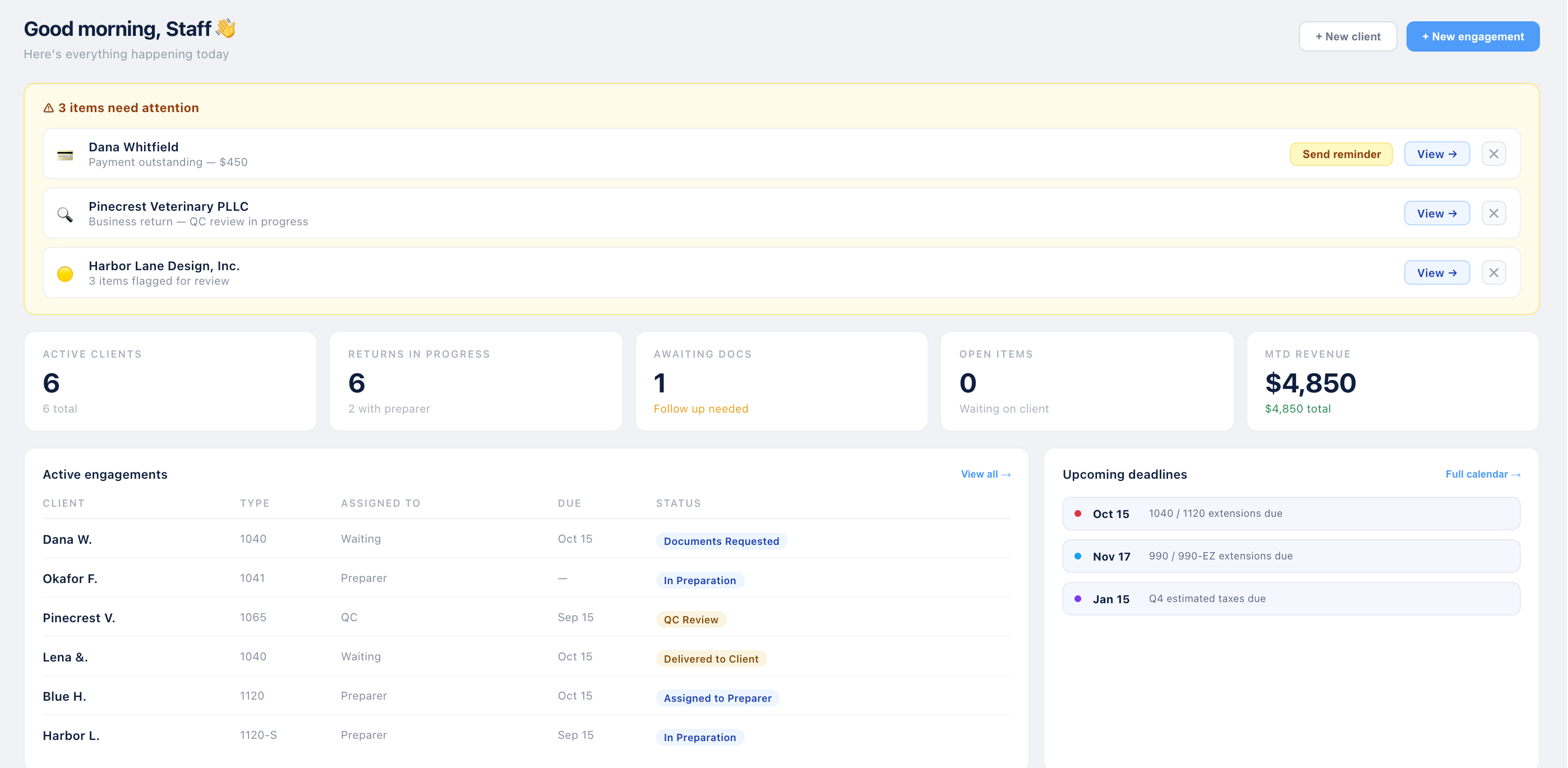
The Crosstie Practice dashboard: items needing attention, client and revenue counts, active engagements with their status, and upcoming deadlines.
The dashboard. A real screen from the working software, shown with fictional clients.
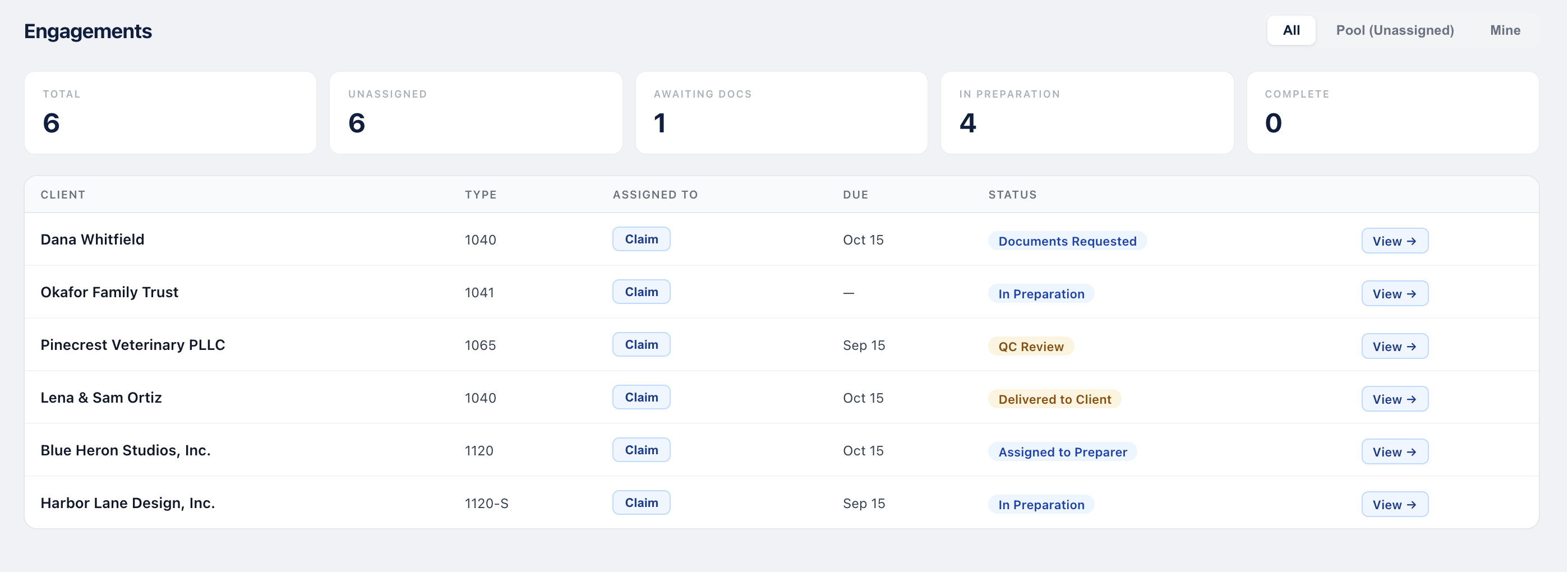
The engagements list: each client's return type, who it's assigned to, its due date and its status.
Engagements. Every return and where it stands. Real screen, fictional clients.
Working today

Workpapers, included in both

The workpaper comes with Crosstie Practice and with Crosstie Tax, at no extra charge. Client documents are read into it, every figure traces to its source, and nothing is computed on a guess. With Crosstie Practice alone, you keep your own tax software and prepare the return there.

Coming soon Exporting a finished workpaper into the tax software you already use, so nothing is keyed twice.

Proposed tax-only entries from the client's ledger: the 50% meals add-back and nondeductible penalties, each waiting to be posted or rejected.
Suggested entries. The 50% meals add-back and nondeductible penalties, found in the client's ledger and waiting for your decision.
Tax depreciation: not entered, and sign-off waits. The books show $4,400 of depreciation and the equipment it relates to.
Stopping instead of guessing. Tax depreciation isn't assumed to equal book, and sign-off waits until it's entered.
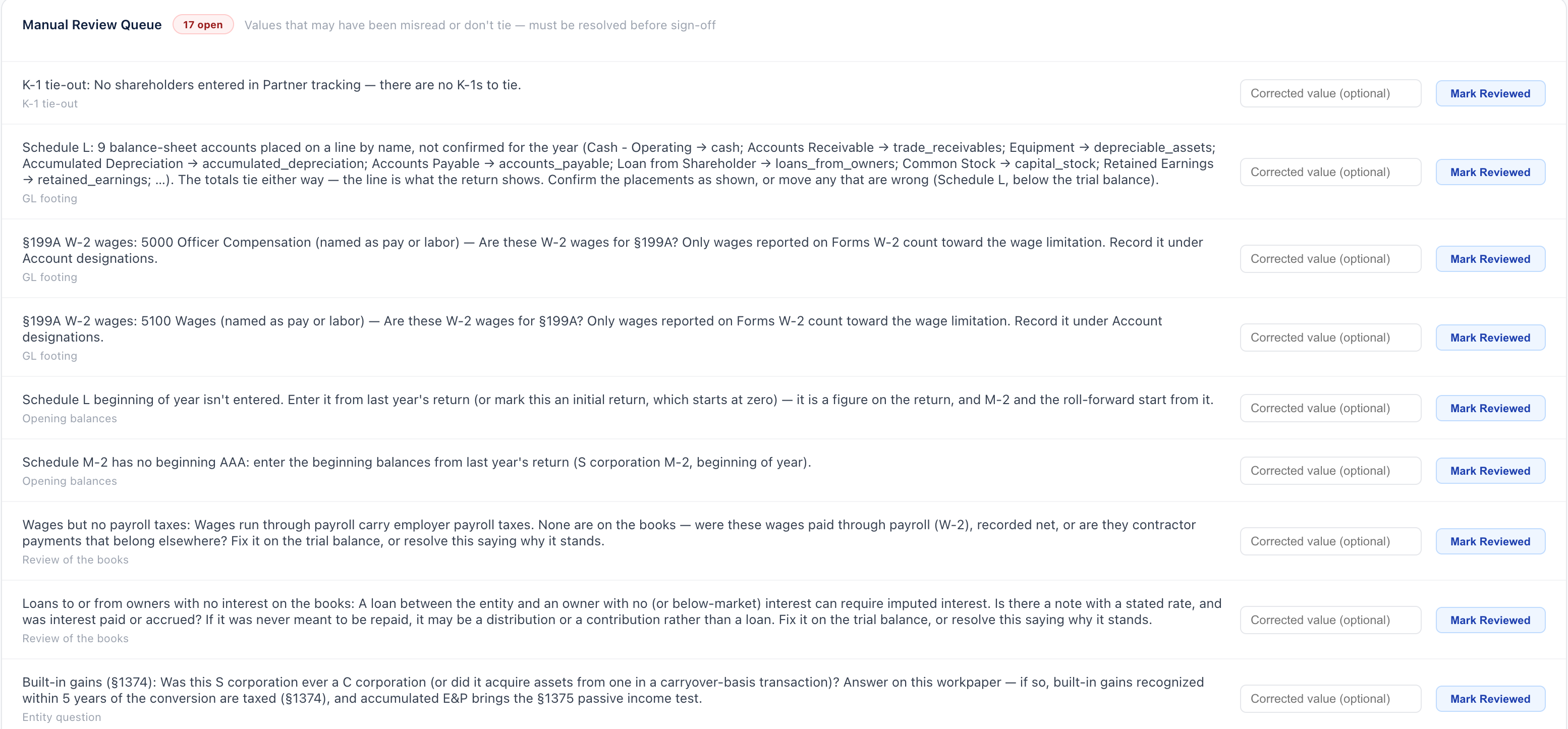
The review queue: 17 open items for one return, each explaining what doesn't tie or what's missing, from unexplained differences to questions raised by the books themselves.
The review queue. What a second reviewer would catch, raised before sign-off. That includes questions from the books themselves, like wages with no payroll taxes, or an owner loan with no interest. Real screen, fictional client.
Coming soon

Crosstie Tax

The filing engine, with workpapers included. The return is prepared from the workpaper and filed, with no export and no second system. It's in development: Crosstie isn't yet authorized to e-file with the IRS, and no date has been set.

From the workpaper to the return, without re-keying

Real screen Workpaper · trial balance, tax column

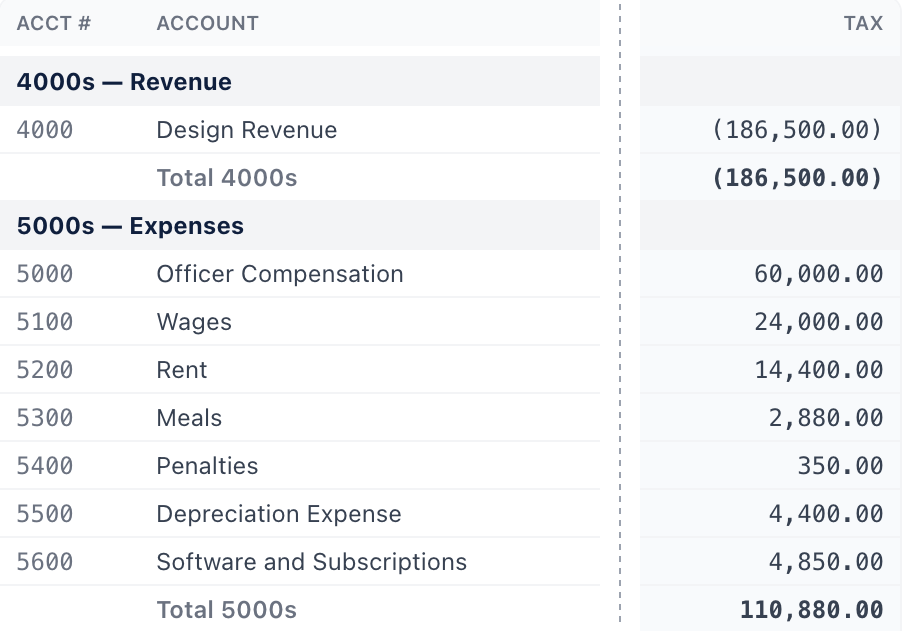
The workpaper's trial balance for a fictional S corporation: Design Revenue 186,500, Officer Compensation 60,000, Wages 24,000, Rent 14,400, Meals 2,880, Penalties 350, Depreciation 4,400, Software 4,850.1234

Preview — in development Return · design mockup

Form 1120-S · Page 1 · Harbor Lane Design, Inc. (fictional)
1 1a Gross receipts or sales
from 4000 Design Revenue
186,500
lines 1b–6
2 7 Compensation of officers
from 5000 Officer Compensation
60,000
3 8 Salaries and wages
from 5100 Wages
24,000
lines 9–10
4 11 Rents
from 5200 Rent
14,400
The same figures, carried across. Left: a real workpaper screen for a fictional client (the book columns are cut out). Right: a design mockup of the return, still in development. Each numbered figure lands on its return line from the account it came from, not typed in again.

Return preparation, coming soon

2025 return · Dana Reyes (fictional)Preview — in development

Schedule C · Part II — expenses

8 Advertising1,200from: invoices
9 Car and truck5,725from: mileage log · 8,000 mi × 70¢ + tolls
13 Depreciation1,500from: asset schedule
17 Legal and professional800from: CPA invoice
from: receipts · try changing it
22 Supplies300from: receipts
24b Deductible meals350from: receipts · $700 × 50%
25 Utilities600from: bills
27b Other expenses960from: statements
28 Total expenses11,885
29 Tentative profit (gross income 34,700)22,815
30 Business use of home (Form 8829 line 36)5,019
31 Net profit17,796
Preview: a design mockup, not working software. Return preparation is still in development and hasn't been tested. What it looks like may change.
Coming soon

Better together: one system, not two

Use them together and there's nothing to move between them. They aren't separate products joined by an integration. They're one system.

One client list

A client added in one place is there in the other, with nothing to match up or keep in sync.

No handoff

The engagement, its documents, the workpaper and the return sit together, so you pick up where you left off.

Time where the work is

Time spent in the tax work counts toward the engagement it belongs to.

Real screens

Demo: from engagement to sign-off

A walk through the working software, one step at a time. Every screen is real, shown with fictional clients. Return preparation isn't part of this walk-through because it's still in development.

  1. Step 1 of 5 · Working today

    Start the day on the dashboard

    The Crosstie Practice dashboard: items needing attention, client and revenue counts, active engagements with their status, and upcoming deadlines.
    What needs attention, what's waiting on the client, and what's due.
  2. Step 2 of 5 · Working today

    Every engagement and where it stands

    The engagements list: each client's return type, who it's assigned to, its due date and its status.
    Each return's type, who has it, its due date and its status.
  3. Step 3 of 5 · Working today

    The workpaper raises what a reviewer would catch

    The review queue: open items for one return, each explaining what doesn't tie or what's missing.
    Every open item stays open until it's fixed or answered with a reason.
  4. Step 4 of 5 · Working today

    Entries suggested from the client's ledger

    Proposed tax-only entries: the 50% meals add-back and nondeductible penalties, each waiting to be posted or rejected.
    The meals add-back and nondeductible penalties, waiting for your decision.
  5. Step 5 of 5 · Working today

    It stops instead of guessing

    Tax depreciation: not entered, and sign-off waits.
    Tax depreciation isn't assumed to equal book. Sign-off waits until it's entered.